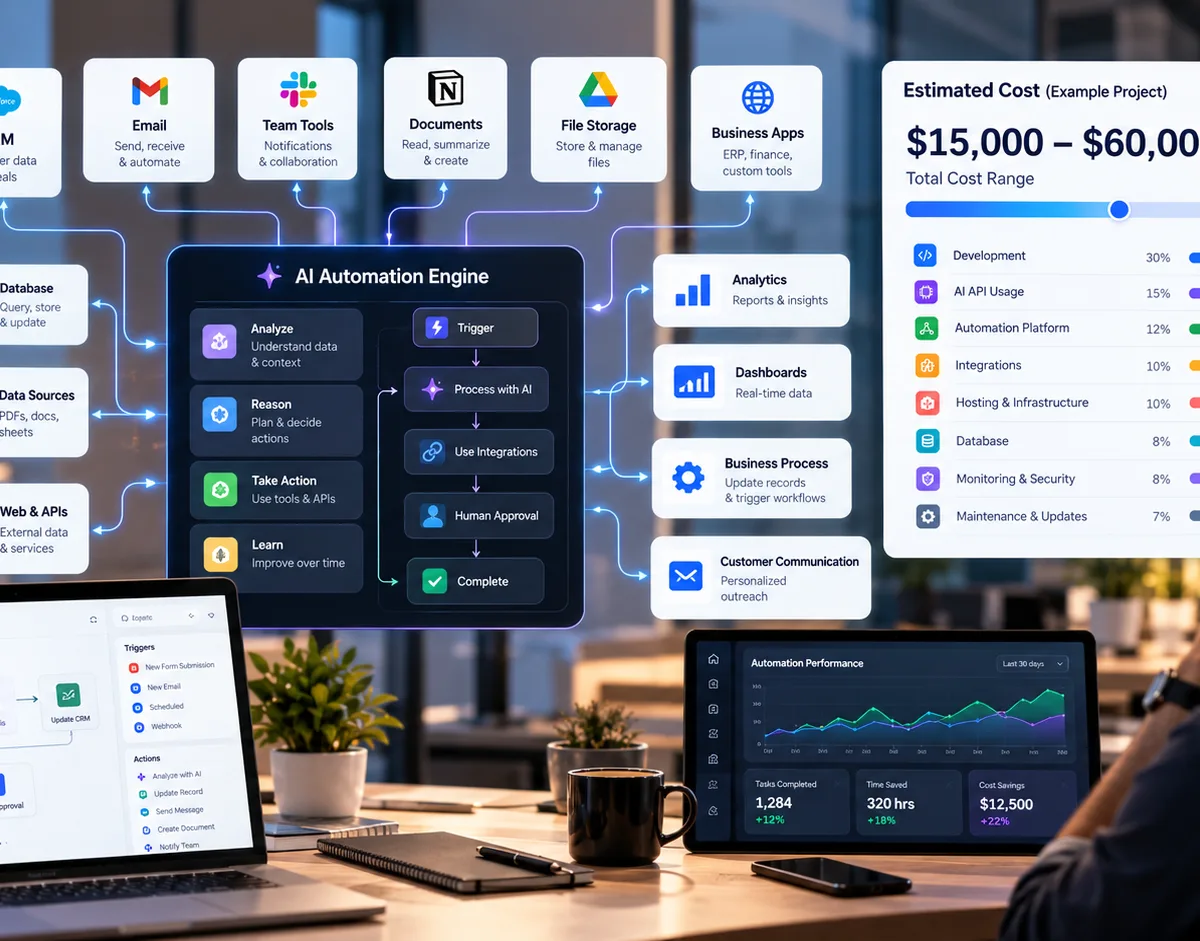
If you've searched for the cost of building an AI automation system, you've probably seen very different numbers.
One company says $1,000. Another says $10,000. Someone else says an AI agent can cost $50,000 or more.
So which number is actually correct?
The answer is that AI automation is not one type of product. A simple workflow connecting two business tools is completely different from a custom AI agent that can make decisions, use multiple tools, access company data, and take actions on its own.
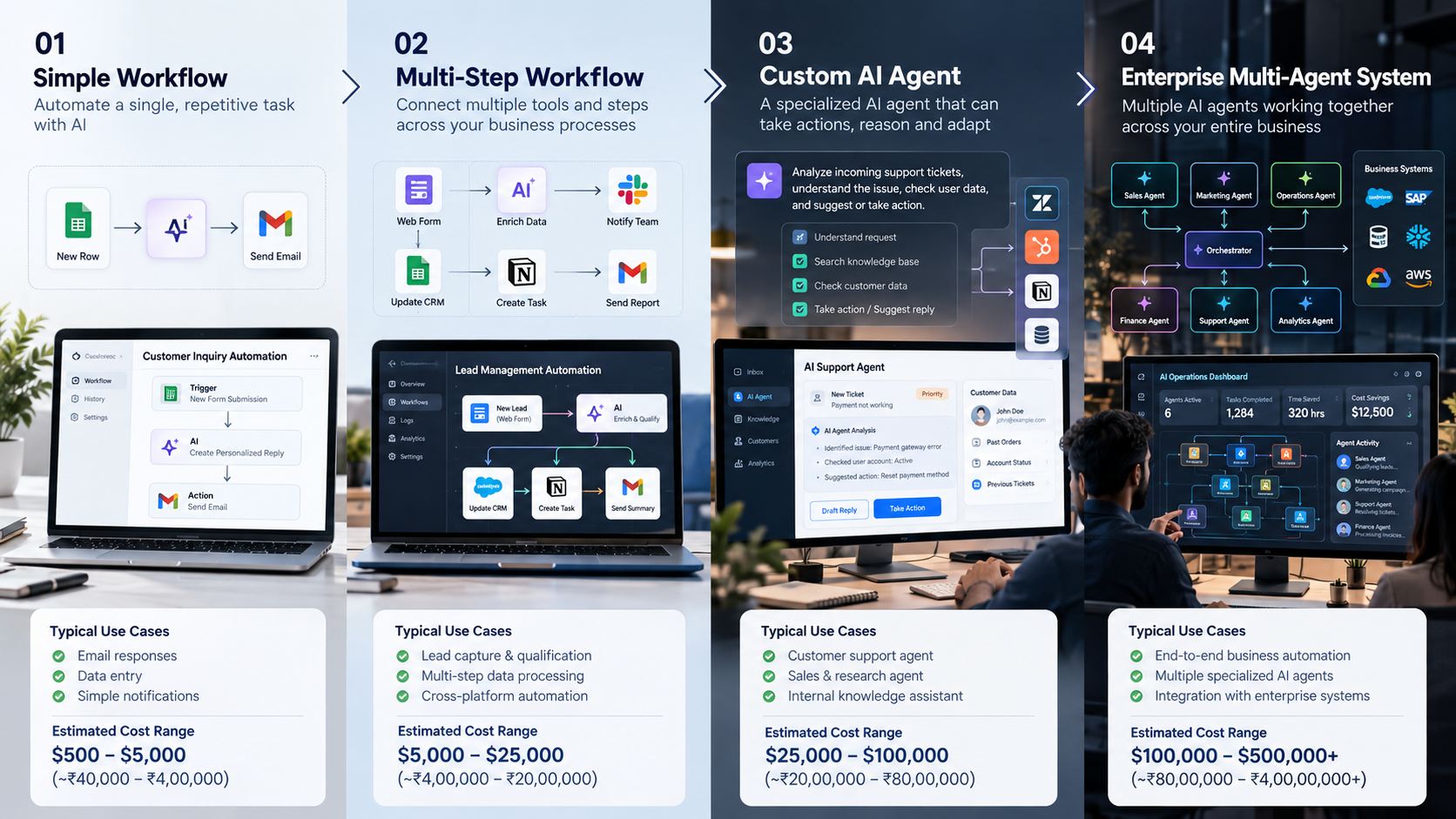
For a realistic 2026 budget, a simple AI automation can start around $1,000–$5,000, a more advanced multi-step system can fall around $5,000–$15,000+, and custom AI-agent systems can reach $20,000–$60,000+, with large enterprise implementations going significantly higher.
These are planning ranges rather than fixed market prices. Recent 2026 pricing guides from Indian AI development companies show similar separation between single-task agents, multi-system agents, and enterprise agentic systems.
The important question isn't simply "How much does AI automation cost?"
It is:
"What exactly are you trying to automate?"
AI Automation Cost in 2026: Quick Breakdown
Type of systemTypical development budgetTypical useSimple AI workflow$1,000–$5,000Lead routing, email, summariesMulti-step automation$5,000–$15,000+CRM + email + AI + multiple toolsCustom AI agent$20,000–$60,000+AI that reasons and takes actionsEnterprise / multi-agent system$60,000–$100,000+Multiple departments and complex infrastructure
These figures are directional budgeting ranges, not a standardized industry price list. Actual costs depend on integrations, data, security, volume, AI complexity, and whether custom software is required.
For Indian businesses, current 2026 agency pricing guides commonly put production AI-agent projects from several lakh rupees upward, with multi-system and enterprise systems reaching much higher ranges.
What Actually Changes the Price?
The biggest mistake is assuming the AI model determines the project price.
It doesn't.
Several other factors can have a much bigger impact.
1. Number of integrations
Connecting one application is relatively simple.
Connecting:
CRM
Gmail
WhatsApp
Slack
Google Sheets
ERP
Database
Payment system
Internal APIs
creates a much larger engineering project.
Every integration may require authentication, data mapping, API handling, testing, retries, and error recovery.
A workflow with two integrations should not cost the same as one connecting ten systems.
2. How much decision-making does the AI need?
There is a major difference between:
"Summarize this email."
and:
"Read this customer email, check their account, determine what happened, decide the appropriate action, update the CRM, and notify the correct employee."
The second system needs much more than an AI API.
It needs business rules, permissions, validation, error handling, and potentially human approval.
That's one reason agentic systems cost more than simple AI-assisted workflows.
3. Data and business logic
AI automation works with the data and processes you give it.
If company information is spread across spreadsheets, PDFs, emails, CRMs, and old internal systems, getting that information into a reliable structure can become a major part of the project.
A technically impressive AI system can still perform badly if the underlying business data is incomplete, inconsistent, or inaccessible.
4. Reliability and error handling
A demo only needs to work when everything goes right.
A production automation needs to handle what happens when things go wrong.
For example:
CRM API fails → retry
AI produces uncertain result → human review
Email fails → retry or alternative action
Duplicate request → prevent duplicate processing
Third-party service changes → alert administrator
This engineering is often invisible when someone gives you a simple development quote, but it is essential if the automation is going to run a real business process.
The Three Costs You Should Separate
When evaluating an AI automation quote, don't look at only the development price.
Think about three separate buckets.
1. Build cost
This is the one-time cost for:
Workflow design
Development
AI integration
API integrations
Testing
Deployment
Documentation
2. Platform and infrastructure cost
This can include:
n8n
Make
Zapier
Hosting
Database
Monitoring
Storage
3. AI and third-party usage
These are variable costs.
Depending on the workflow, you may pay for:
AI model calls
Email
WhatsApp
SMS
OCR
Web search
Data enrichment
Other APIs
Keeping these costs separate makes the project much easier to understand.
How Much Do AI APIs Cost?
AI API costs have become much more flexible in 2026.
For example, OpenAI's current API pricing lists GPT-6 Luna at $0.10 per million input tokens and $0.50 per million output tokens, while GPT-6 Sol is listed at $2 per million input tokens and $10 per million output tokens.
Anthropic's current pricing similarly varies significantly between models. Claude Sonnet 5 is listed at $2 per million input tokens and $10 per million output tokens.
That means businesses don't necessarily need to use the most expensive model for every task.
A well-designed automation might use:
Smaller model → classification
Smaller model → extraction
More capable model → complex reasoning
Normal code → calculations and validation
This can keep AI usage costs under control.
The exact monthly bill still depends on how often the system runs, how much context it processes, and which models and tools it uses.
What About n8n, Make, and Zapier?
The automation platform is another recurring cost.
n8n
n8n offers hosted plans based around workflow executions and also supports self-hosting. Its current pricing page lists a Starter plan at €20/month when billed annually for 2,500 executions and a Pro plan at €50/month when billed annually for 10,000 executions.
Make
Make currently lists:
Free: 1,000 credits/month
Core: $12/month for 10,000 credits
Pro: $21/month for 10,000 credits
Teams: $38/month for 10,000 credits
Its usage is credit-based, so your actual workflow determines how quickly those credits are consumed.
Zapier
Zapier's Professional plan currently starts at $19.99/month, while its Team plan starts at $69/month. Its pricing structure also depends on task and workflow usage.
So don't ask only:
"Which platform is cheapest?"
Ask:
"Which pricing model fits my workflow?"
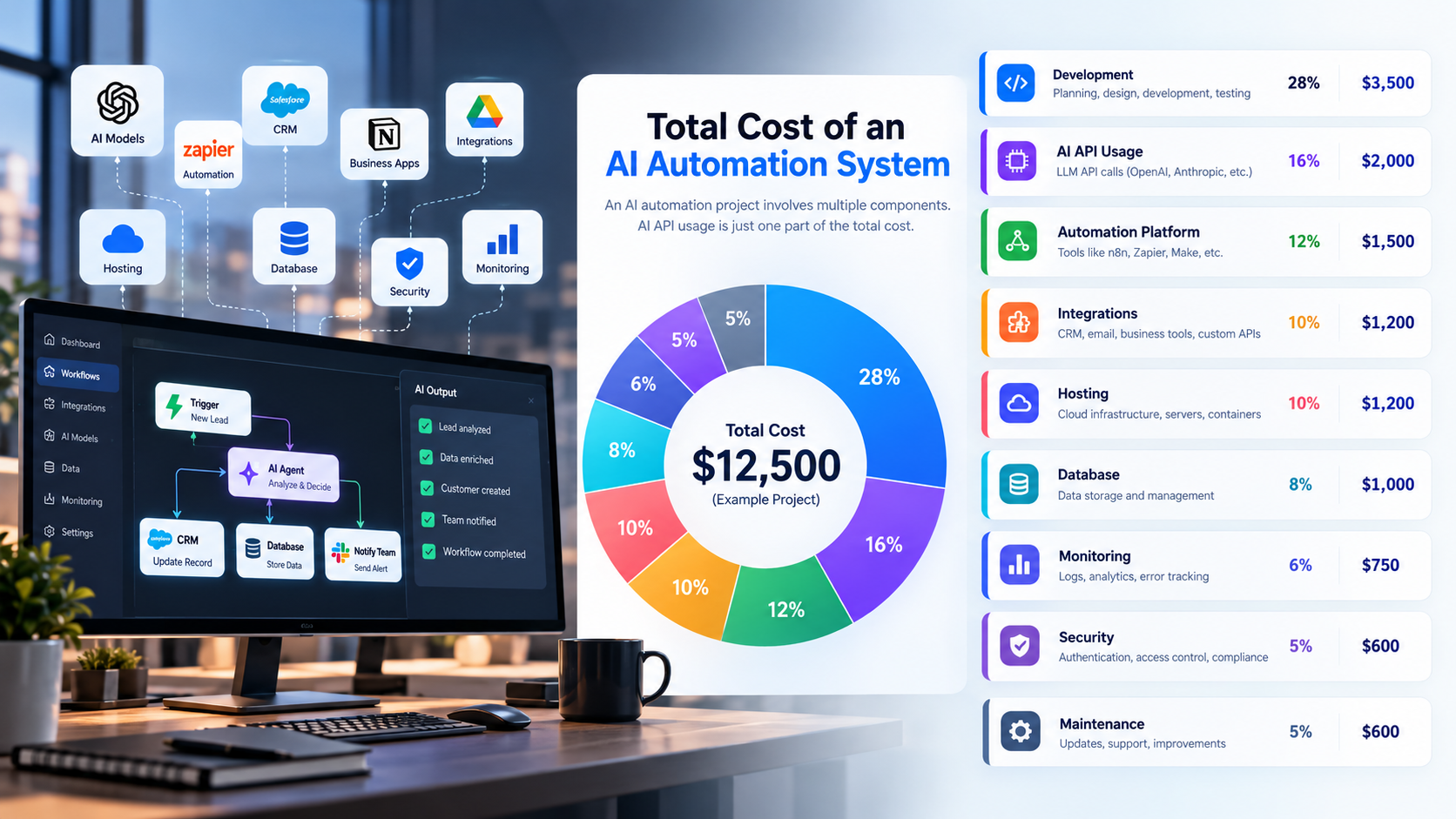
What Does It Cost to Run After Launch?
This is the part many buyers forget.
A Reddit discussion from May 2026 about running client n8n automations highlighted that basic hosting can be relatively inexpensive, while API usage, monitoring, debugging, and maintenance can become the bigger ongoing considerations. One participant reported small self-hosted infrastructure costs, while others emphasized that variable API costs and maintenance time should be tracked separately.
Another discussion from May 2026 described a client with several always-on workflows where maintenance took significantly more time than originally expected because of alerts, fixes, version changes, and upstream services.
This leads to an important distinction:
The cost of hosting an automation is not necessarily the cost of maintaining an automation.
A production system may need:
Monitoring
Bug fixes
API updates
Workflow changes
Prompt updates
Security updates
Backups
Usage monitoring
So when comparing proposals, ask what happens after launch.
Is Self-Hosting Cheaper?
Sometimes.
Self-hosting an automation platform can reduce software subscription costs, especially for technical teams that are comfortable managing servers.
But you become responsible for:
Server management
Security
Updates
Backups
Monitoring
Database maintenance
Recovery when something fails
Recent n8n community discussions repeatedly make the same point: infrastructure itself may be relatively cheap, but the time spent keeping client automations reliable is a separate cost.
For a business without technical resources, a managed platform can therefore be worth paying for.
Do You Need an AI Agent?
Not necessarily.
This is one of the most important decisions to make before development starts.
Use normal automation when:
The process is predictable.
Example:
New form → add CRM record → send email.
Use AI when:
The system needs to understand unstructured information.
Example:
Read the customer message → determine whether it is a sales, support, or billing request.
Consider an AI agent when:
The system needs to reason through multiple steps and use different tools.
Example:
Research a lead → check CRM → analyze company → decide whether it qualifies → create personalized outreach → update CRM.
AI agents are becoming increasingly action-oriented in 2026. Recent developments across the industry show agents moving beyond conversation toward completing tasks and interacting with external services.
That does not mean every business needs an autonomous agent.
Often, a well-designed workflow with a few carefully controlled AI steps is enough.
How Can You Estimate Your Own Project?
Use this simple framework.
If you're automating one repetitive process between one or two tools:
Think simple workflow.
If you're connecting several tools with branching logic and AI-assisted decisions:
Think multi-step automation.
If you want AI to independently decide what actions to take across multiple systems:
Think custom AI agent.
If you're deploying agents across multiple teams with strict security, permissions, and audit requirements:
Think enterprise system.
This is much more useful than comparing your project with a random AI automation price you found online.
Questions to Ask Before Hiring an AI Automation Developer
Before accepting a proposal, ask:
Will the system run on my own accounts?
Your business should understand who owns the AI provider, automation platform, and third-party accounts.
What happens when the AI makes a mistake?
Ask whether there are validation, fallback, or human-review mechanisms.
What happens when an API goes down?
Ask about retries and failure handling.
What will I pay every month after launch?
Separate platform, AI, third-party, hosting, and maintenance costs.
Who maintains the system?
APIs and business processes change. Someone needs to own those updates.
What exactly is included in the development quote?
Get the integrations, workflows, testing, deployment, and documentation clearly defined.
Frequently Asked Questions
How much does a basic AI automation cost in 2026?
A simple business workflow can start around $1,000–$5,000, depending on the integrations and complexity.
How much does an AI agent cost?
A production AI agent can range from several thousand dollars to tens of thousands. Indian 2026 development guides currently show single-task agents from roughly ₹1.5–₹4 lakh and more advanced multi-system agents reaching ₹10–₹35 lakh or more.
Is AI automation expensive to run?
Not necessarily. Small workflows can have relatively low infrastructure and AI costs, while high-volume systems can become significantly more expensive.
Is n8n cheaper than Zapier?
It depends on your workflow volume and how you deploy it. n8n, Make, and Zapier use different pricing models, so the cheapest subscription is not necessarily the cheapest overall solution.
Can I build AI automation without coding?
Yes. Tools such as n8n, Make, and Zapier can handle many workflows without traditional software development. Custom development becomes more useful when the workflow requires complex business logic, custom APIs, security, or a custom application.
What is the biggest hidden cost?
Usually, it isn't the AI model itself.
Integration work, maintenance, monitoring, reliability, and third-party services can become significant costs after launch.
Final Takeaway
So, how much does it cost to build an AI automation system in 2026?
A practical starting point is:
Simple workflow: $1,000–$5,000
Multi-step business automation: $5,000–$15,000+
Custom AI agent: $20,000–$60,000+
Large enterprise system: $60,000–$100,000+
These are planning ranges, not fixed quotes.
The biggest factors are:
Integrations + business logic + AI complexity + reliability + security + ongoing maintenance
And before you spend money on an AI agent, ask a simpler question:
What repetitive business process are we actually trying to improve?
Map that process first.
Then decide what should be automated with normal software, where AI is useful, and whether an agent is genuinely necessary.
That usually gives you a much more realistic project scope and a much clearer answer to the question:
"How much will my AI automation actually cost?"