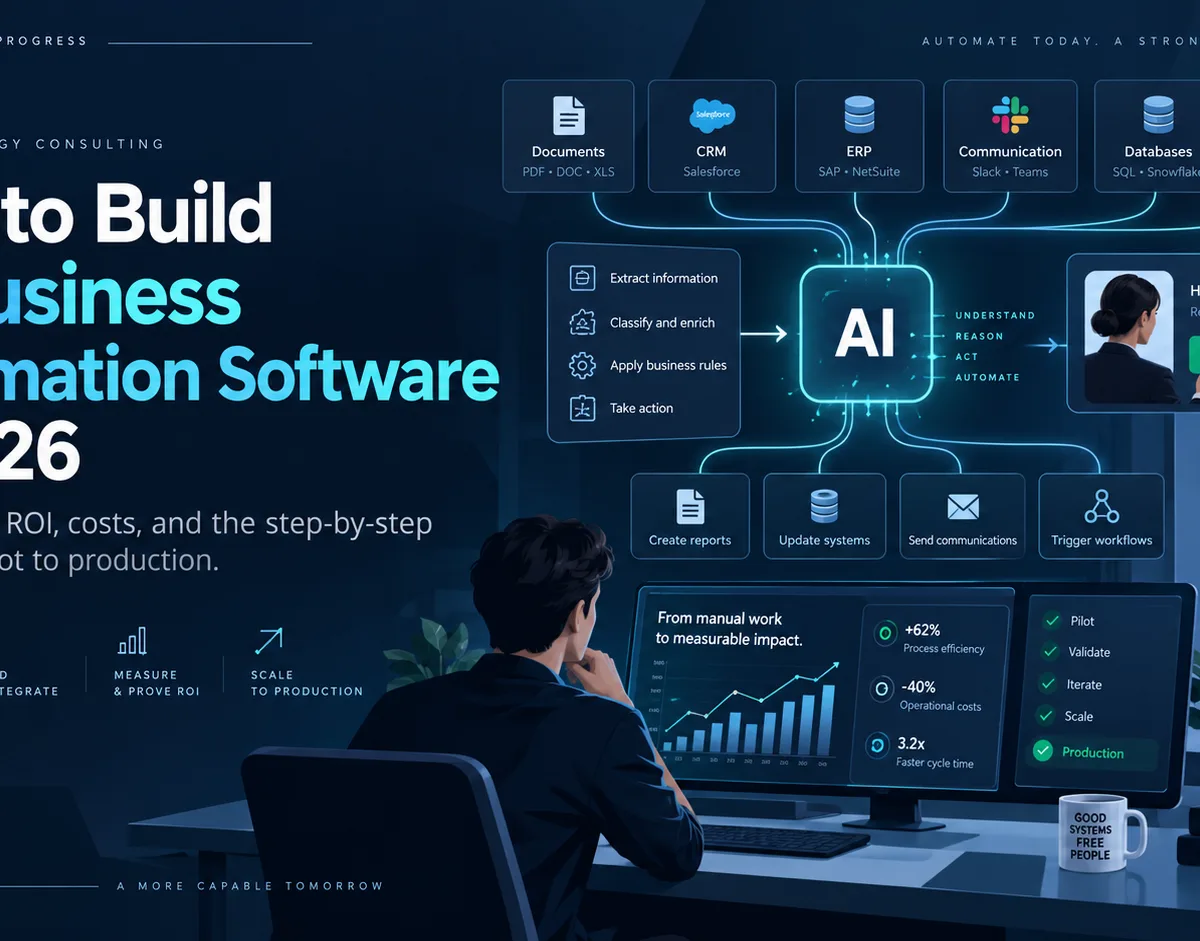
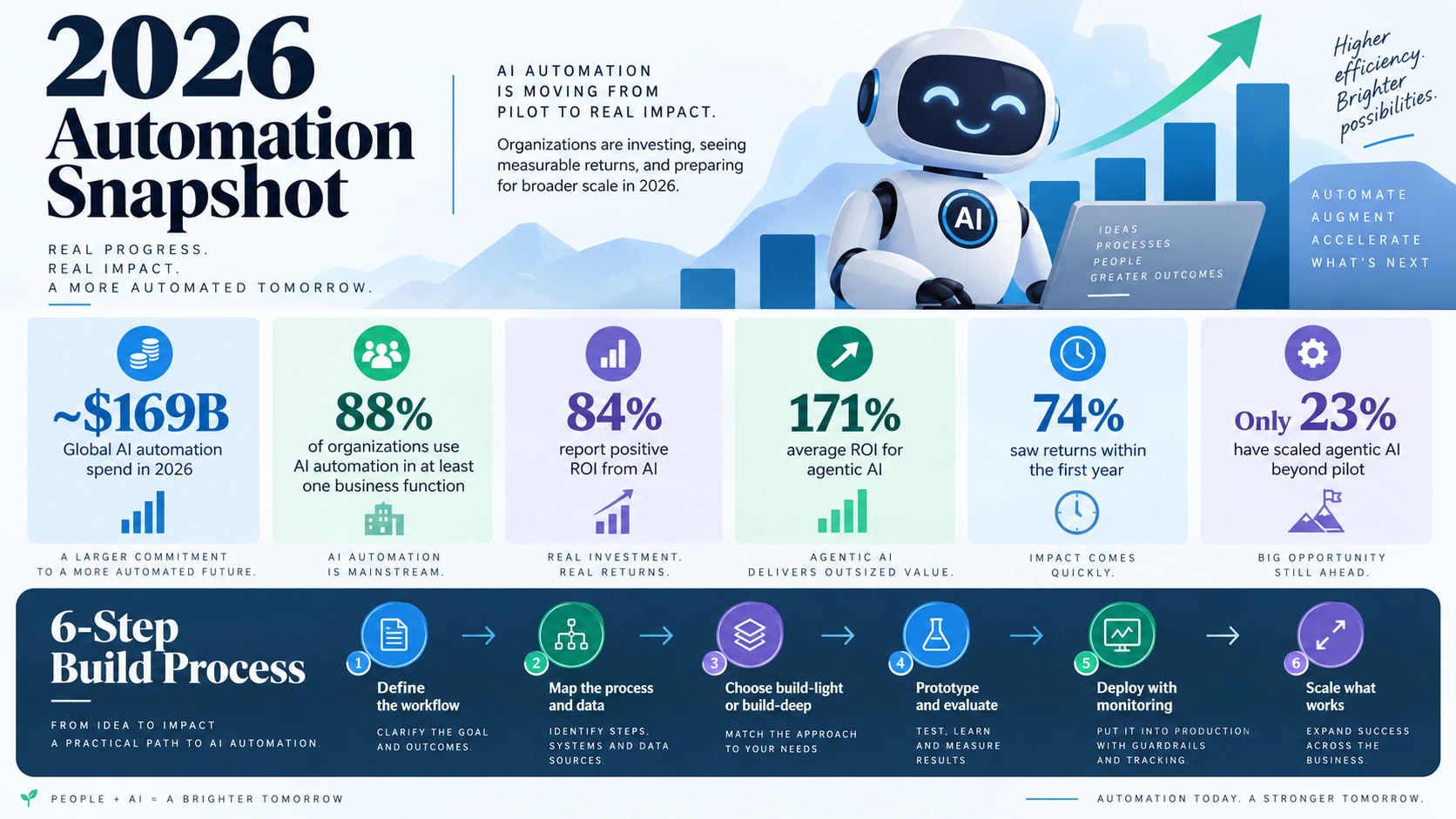
Most business automation used to mean if-this-then-that: rigid rules, fixed paths, and a support ticket every time reality didn't match the script. That's not what "automation" means anymore. In 2026, AI-driven automation software can read context, make judgment calls within boundaries you define, and handle the exceptions that used to require a human. The market has noticed: global AI automation spend is on track to hit roughly $169 billion in 2026, and 88% of organizations now use AI automation in at least one business function, up from just 55% as recently as 2023.
That growth is real, but so is the failure rate. A meaningful share of AI automation projects stall somewhere between a promising demo and a system anyone actually trusts in production. The difference almost always comes down to how the software was architected and built, not which model powers it. This guide walks through both: the business case, and the actual steps to build something that works.
The Business Case, in Four Numbers
Before committing engineering time, it's worth knowing what the data actually shows about AI automation ROI:
84% of organizations investing in AI report positive returns on that investment.
Companies deploying agentic AI specifically report an average 171% ROI, with U.S. enterprises reporting closer to 192%, roughly triple the return of traditional rule-based automation.
AI-handled customer interactions cost an estimated $0.50 to $0.70 each, compared to $6 to $8 for a human-handled interaction, a meaningful cost gap at any real volume.
74% of executives whose organizations have introduced agentic AI say they saw returns within the first year.
The gap worth paying attention to: only about 23% of organizations that use AI in some function have actually scaled agentic AI beyond a pilot. Most of that gap is architecture and process, not technology.
What "AI Business Automation Software" Actually Means
Traditional robotic process automation (RPA) follows a fixed script: click here, copy this field, paste it there, exactly the same way every time. It breaks the moment a screen changes or an input doesn't match the expected format.
AI-driven automation software works differently. Instead of a fixed script, it uses a language model to interpret context, a data layer to ground its answers in your actual company information, and an orchestration layer to decide which tool or system to act on next, within limits you set. It's the difference between a script and a junior employee following a well-documented process: more flexible, more capable of handling exceptions, and, if it's built carelessly, more capable of getting something wrong in a way a rigid script never could.
The Architecture: What You're Actually Building
Before writing code, it helps to know what "done" looks like. A production-grade AI automation system typically has seven layers:
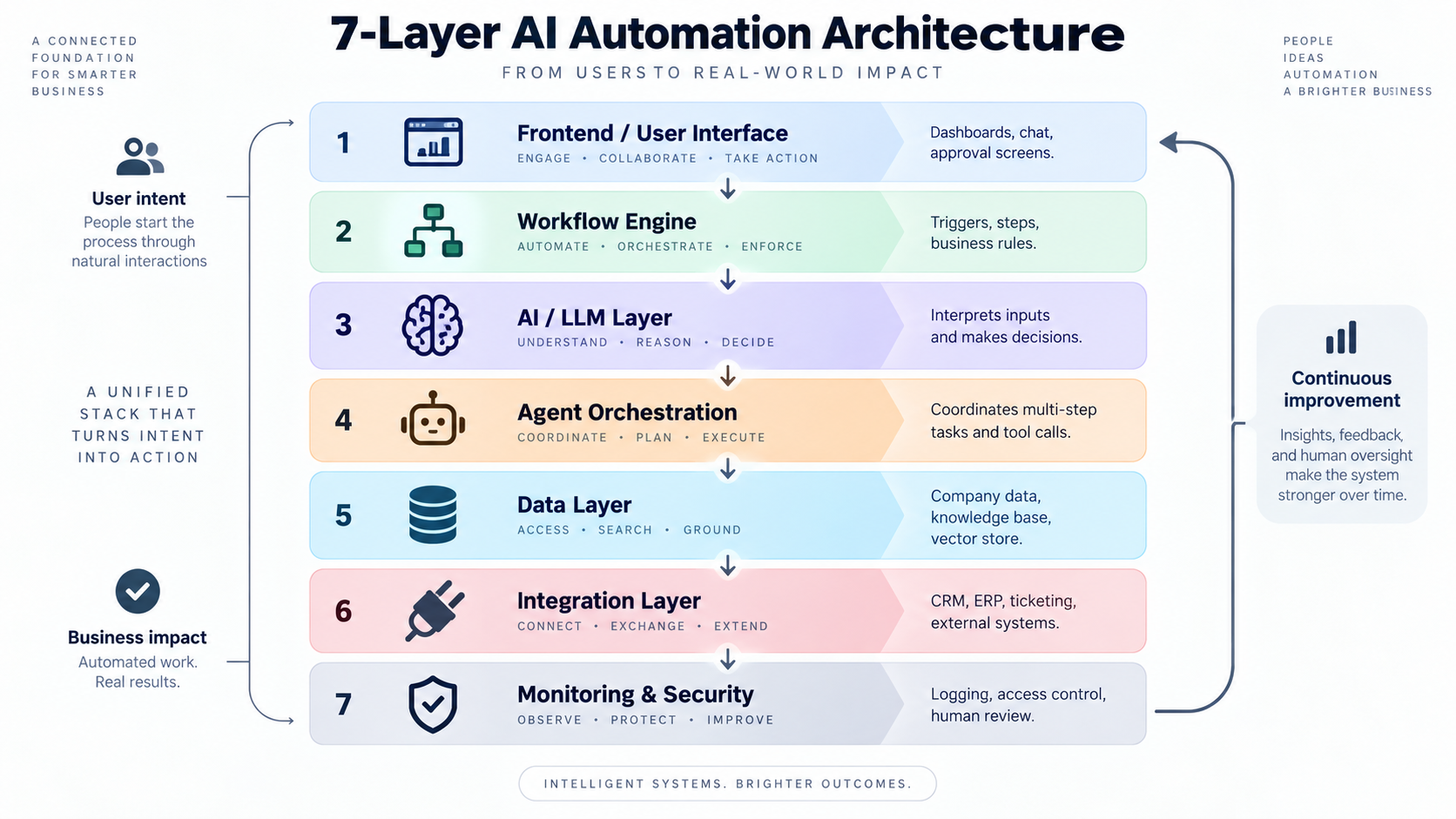
Frontend / user interface: the dashboards, chat interfaces, or approval screens people actually interact with
Workflow engine: defines the steps, triggers, and business rules the automation follows
AI / LLM layer: the reasoning model that interprets input and makes decisions
Agent orchestration: coordinates multiple specialized agents and tool calls when a task needs more than one step
Data layer: your company's own data, often in a vector store, so the AI grounds its answers in reality instead of guessing
Integration layer: connects the automation to your CRM, ERP, ticketing system, or whatever it needs to actually act on
Monitoring and security: logging, access control, and human-in-the-loop review for anything higher-stakes
Skipping layers rarely saves time. It just moves the cost from "building it properly" to "debugging it in production," usually at a worse moment.
How to Actually Build It: A Five-Phase Approach
Phase 1: Define the business problem, not the technology. The most common failure mode is starting with a model and looking for a use case, instead of starting with a workflow that's genuinely expensive to run manually. Pick one process: ticket routing, lead qualification, invoice processing, delivery estimation, and define what success looks like in numbers before writing any code.
Phase 2: Map the workflow and document the data. Before any AI touches this process, write down every step it currently takes, every system it touches, and every edge case a human currently handles by judgment. This documentation step is the one teams skip most often, and skipping it is the single most cited reason automation projects fail to reach production.
Phase 3: Choose build-light or build-deep. For the large majority of business use cases, composing existing tools, a hosted model via API plus retrieval-augmented generation (RAG) over your own documents, gets you further, faster, and cheaper than building custom models. Reserve fine-tuning or custom model training for cases where latency, data sensitivity, or cost genuinely demand it.
Phase 4: Prototype small, and evaluate honestly. Run a pilot with a limited group of real users, not just internal testers. Build an evaluation set that checks task success rate, factual accuracy, and how the system handles a deliberately ambiguous or adversarial input. Require human sign-off on outputs before anything reaches a customer, at least at first.
Phase 5: Deploy with monitoring from day one. Track latency, tool-call success rate, cost per run, and how often the system has to escalate to a human. Set alerts before launch, not after. Review the first batch of real runs manually, no matter how clean the test results looked, because production traffic always surfaces something the test suite didn't.
What This Actually Costs
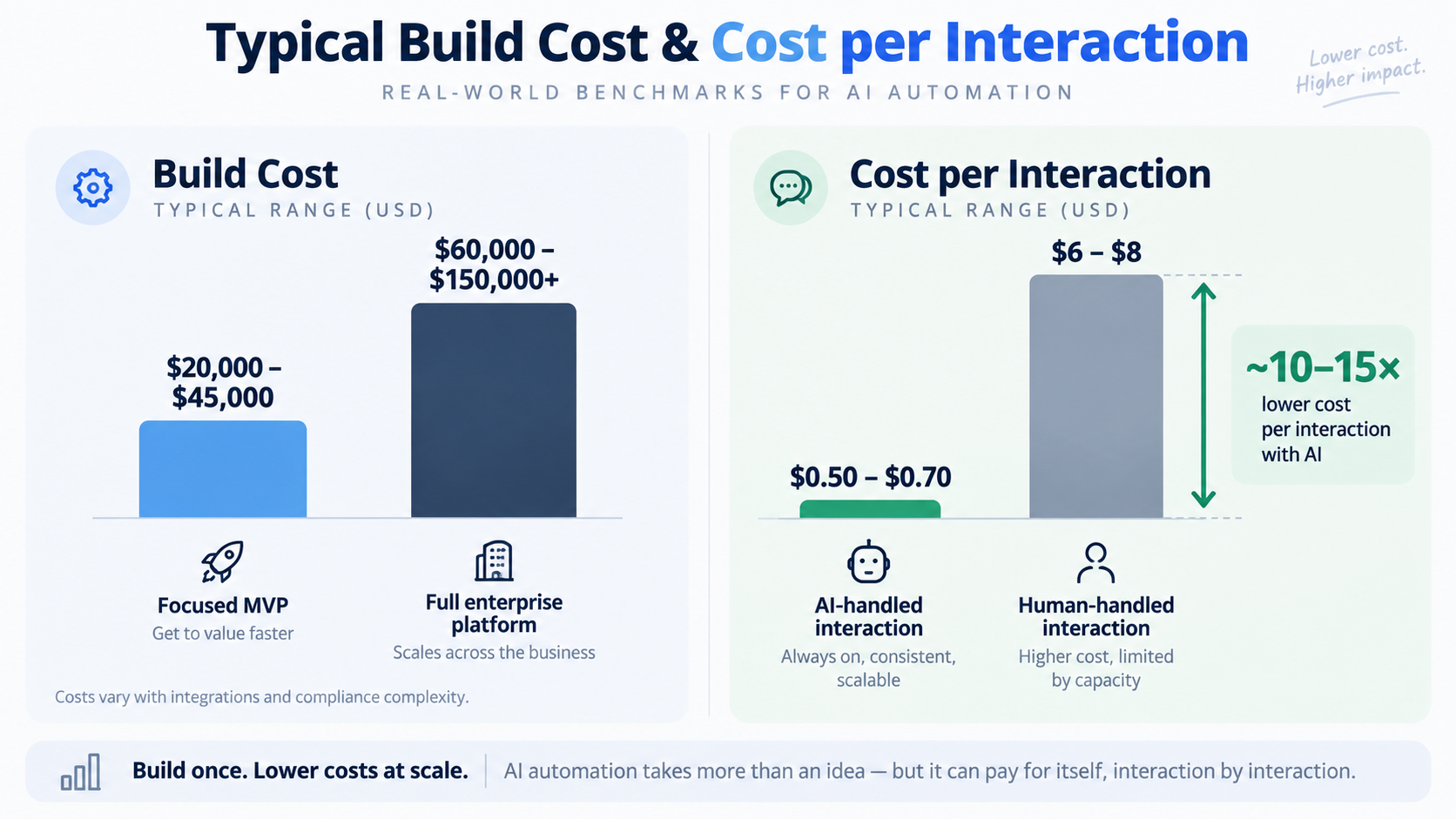
Realistic 2026 figures put a focused MVP, one workflow, the core layers, a working pilot, in the $20,000 to $45,000 range. A full enterprise platform covering the entire seven-layer stack with multiple workflows typically runs $60,000 to $150,000 or more, depending on integration complexity and compliance requirements.
That range is wide on purpose: the business case in the section above only holds if you actually reach production. A $150,000 platform that never ships past pilot is a worse outcome than a $25,000 MVP that automates one real workflow reliably.
Common Mistakes That Sink These Projects
Starting with the model, not the workflow. Choosing a model before the process is mapped and the data is clean is the most frequently cited reason automation builds stall.
No human-in-the-loop for early deployments. Removing human review too early is how a single bad output becomes a trust problem the whole project doesn't recover from.
Skipping the evaluation suite. Without a defined way to measure accuracy and failure modes, teams often don't notice quality has degraded until a customer notices first.
Treating monitoring as optional. Cost per run, latency, and escalation rate need to be visible from day one, not added after something goes wrong at scale.
Trying to automate everything at once. Programs that start with one well-scoped workflow reach production far more often than programs that launch as a company-wide automation platform.
How Burntstack Approaches AI Automation Builds
We treat every automation build as production software from day one, not a proof of concept that might graduate later:
Workflow first, model second. We map and document the process before any model or architecture decision gets made.
Build-light by default. We compose proven models and tools unless your use case genuinely justifies custom model work.
Evaluation before launch. Every automation ships with a defined accuracy and failure-mode test suite, not just a demo that worked once.
Human-in-the-loop where it matters. Review checkpoints stay in place until the data justifies removing them, not before.
Monitoring from the first deployment. Cost, latency, and escalation rate are visible from day one, so problems get caught before customers do.
FAQ
How much does it cost to build AI automation software? A focused MVP covering one workflow typically runs $20,000 to $45,000. A full enterprise platform with multiple workflows and the complete architecture stack typically runs $60,000 to $150,000 or more, depending on integration and compliance needs.
Do I need to build a custom AI model? Almost never, for most business use cases. Composing an existing hosted model with retrieval-augmented generation over your own data is faster, cheaper, and lower-risk than training a custom model. Custom models make sense only when latency, data sensitivity, or cost genuinely require it.
What's the biggest reason AI automation projects fail? Starting with the technology instead of the workflow. Projects that skip mapping the process and documenting the data before building are the most likely to stall before reaching production.
How long does it take to build AI automation software? A focused MVP around one workflow is often achievable in weeks. Timelines extend mainly when scope isn't bounded, teams that try to automate multiple workflows or build the full architecture stack before proving value on one process typically take significantly longer.
Where to Start
The businesses seeing real returns from AI automation in 2026 aren't the ones with the most ambitious build. They're the ones that mapped one expensive workflow carefully, built the right layers for it, measured the result honestly, and only then decided what to automate next. Burntstack Technologies builds AI automation software the same way: one workflow, properly architected, measured before it scales.
This post reflects publicly available market research and industry benchmark data as of September 2026. Cost, adoption, and ROI figures vary by source and business context and should be treated as directional estimates, not guarantees.